Arrange files into categories
Documan is a productivity software developed by an indie developer named Bernd Vormbaum for desktop use. In your latest Windows device, you will be able to effortlessly organize all of your document files and sort them into categories. Within just a single tool, you can also conveniently search file names or entire documents. It works in the older versions of Windows. However, there's no guarantee if it works properly. This is a freeware program, but company licenses are available to be purchased also.
Easily manage and organize files
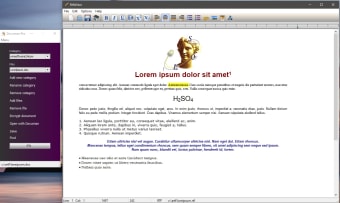
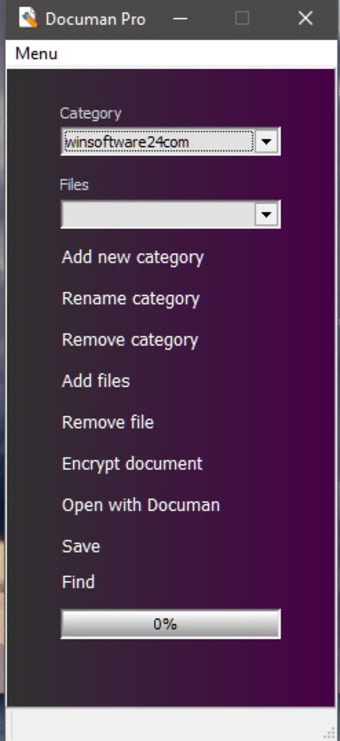
For every data stored in your hard drive system, you can organize them according to categories. This makes document management a lot easier to do. All files will be kept in the same location. However, this time, you can effortlessly look for them through their corresponding Documan category. It has a simple and straightforward user interface wherein you'll see two drop-down lists and a few buttons that are layout sloppily.
Nevertheless, the software works fine even with several performance drawbacks. To manage your files with ease, you must create and name the categories first. The made categories will then be displayed under the drop-down list. In it, you can put as many documents as you want without any file type restrictions. Remember to click the Save once everything is set since there's a huge possibility that you will lose it if you forgot to do so.
You will have the capability to rename and remove categories and even add and delete documents here anytime you want. However, the move or copy function is prohibited among the categories. These features could be handy for you. Unfortunately, it isn't available. The developer should work on this and consider adding more valuable features to be a better program.
Declutter your desktop
Documan is an essential software, especially for computer users that handle many document files for their work or school. Organizing your files into categories will prevent you from dealing with overwhelming clutter on your desktop. Although it needs a lot of work, specifically with its features and layout, it is a functional tool to keep.








.png)

.png)